Canva template link vs share link: edit, view and template links compared
Short answer
A template link gives every person who opens it their own copy and leaves your original alone. An edit share link puts them inside your original and a view link only lets them look, so for selling or handing out templates the template link is the only one of the three that works.
Why there are three links in the Share menu
Canva's Share menu is built for teamwork first. The link at the top is a collaboration link: it lets the people who have it view, comment on or edit the design itself. Selling a template is the opposite situation. You want strangers to get a copy and never touch the original.
So the Share menu holds links that look alike in a PDF but behave very differently. All of them start with canva.com/design/, and most people never look past that.
Not sure which one you shared? Check it
Paste the link from your PDF. The result names the link type and shows what a signed-out buyer sees, with a screenshot.
Template link vs edit link vs view link
Canva's labels in the Share menu have changed over time, but the three behaviours have stayed the same:
| Template link | Edit link | View link | |
|---|---|---|---|
| Made with | Share → More → Template link | Collaboration link set to “can edit” | Collaboration link set to “can view”, or a view-only link |
| What the buyer gets | Their own copy to edit | Your original design, open for editing | A look at the design, no copy |
| Risk to your master | None | High: their changes reach every buyer after them | None, but the sale fails |
| Good for | Selling and sharing templates | Collaborators you trust | Showing a preview |
If you remember one row, make it the third. An edit link is the only one that can damage the file you sell.
What each link does to a buyer, side by side
Template link
- Buyer opensYour template link
- Canva showsYour design, then Use template
- Buyer getsTheir own copy, your master untouched
Edit link (anyone with the link can edit)
- Buyer opensYour edit link
- Canva showsYour original, open in the editor
- Buyer getsYour master file, shared with every buyer
View link
- Buyer opensYour view link
- Canva showsThe design, view only
- Buyer getsNothing to copy, then an access request
The template link: a copy for every buyer
When a buyer opens a template link, Canva shows them the design. Once they are signed in, they choose Use template and Canva makes a copy in their own account. Whatever they change happens in that copy. Your original, and every other buyer's copy, stays as it was.
Creating one needs a paid Canva plan or a free trial since around the end of January 2025. The steps are in how to create a Canva template link.
The edit link: buyers inside your master file
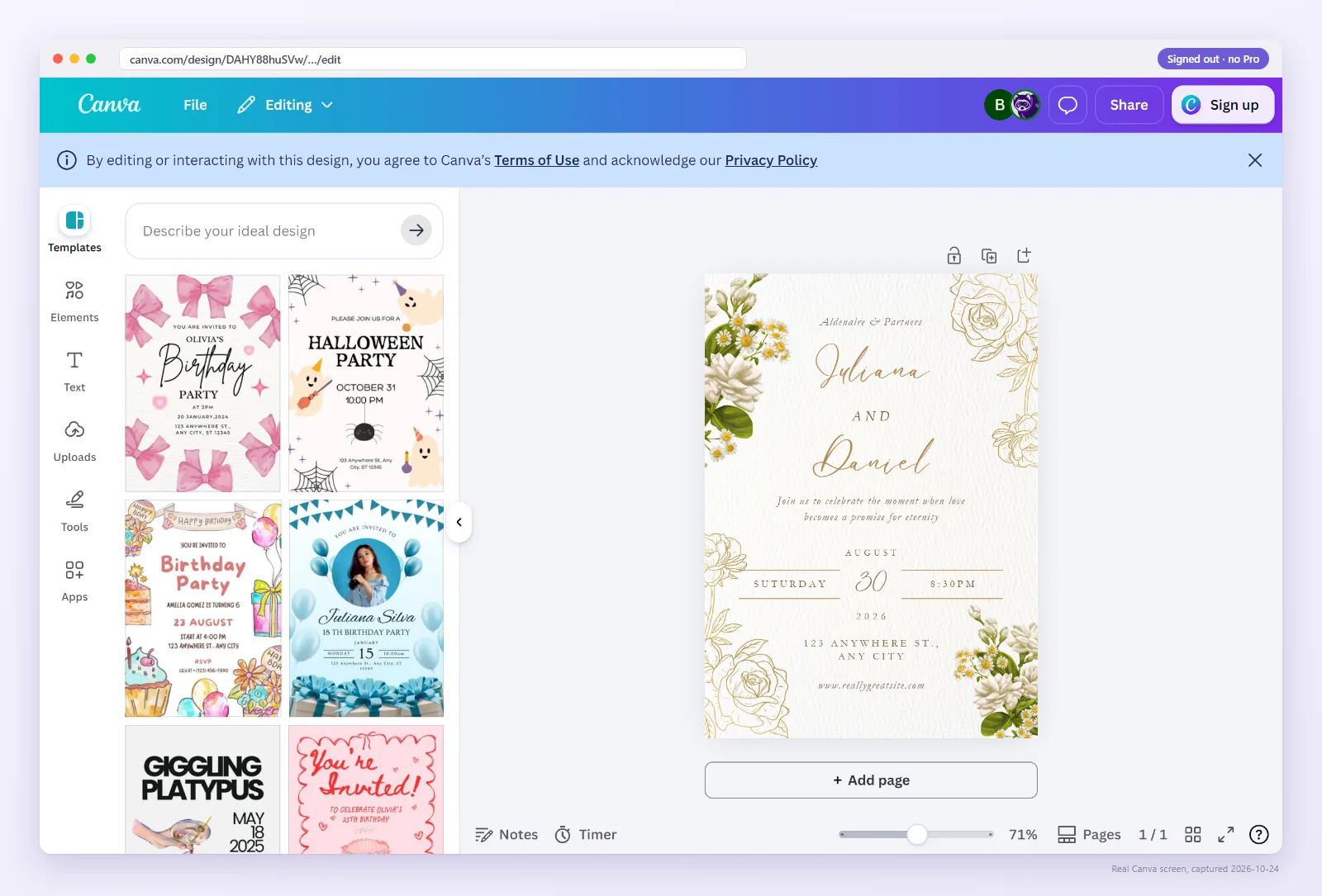
An edit link opens the design itself. There is no copy step. If a buyer types their own text, swaps a photo or deletes a page, they did it to your master, and the next buyer sees their changes. Etsy community threads report exactly this: sellers finding buyer edits in their original design, and buyers being asked to request access after purchase.
When we open an edit link signed out, Canva can drop the visitor straight into the editor of the original design. That is the first screen pictured above. What to do if you have already shipped one is in anyone with the link can edit.
The view link: looks fine, sells nothing
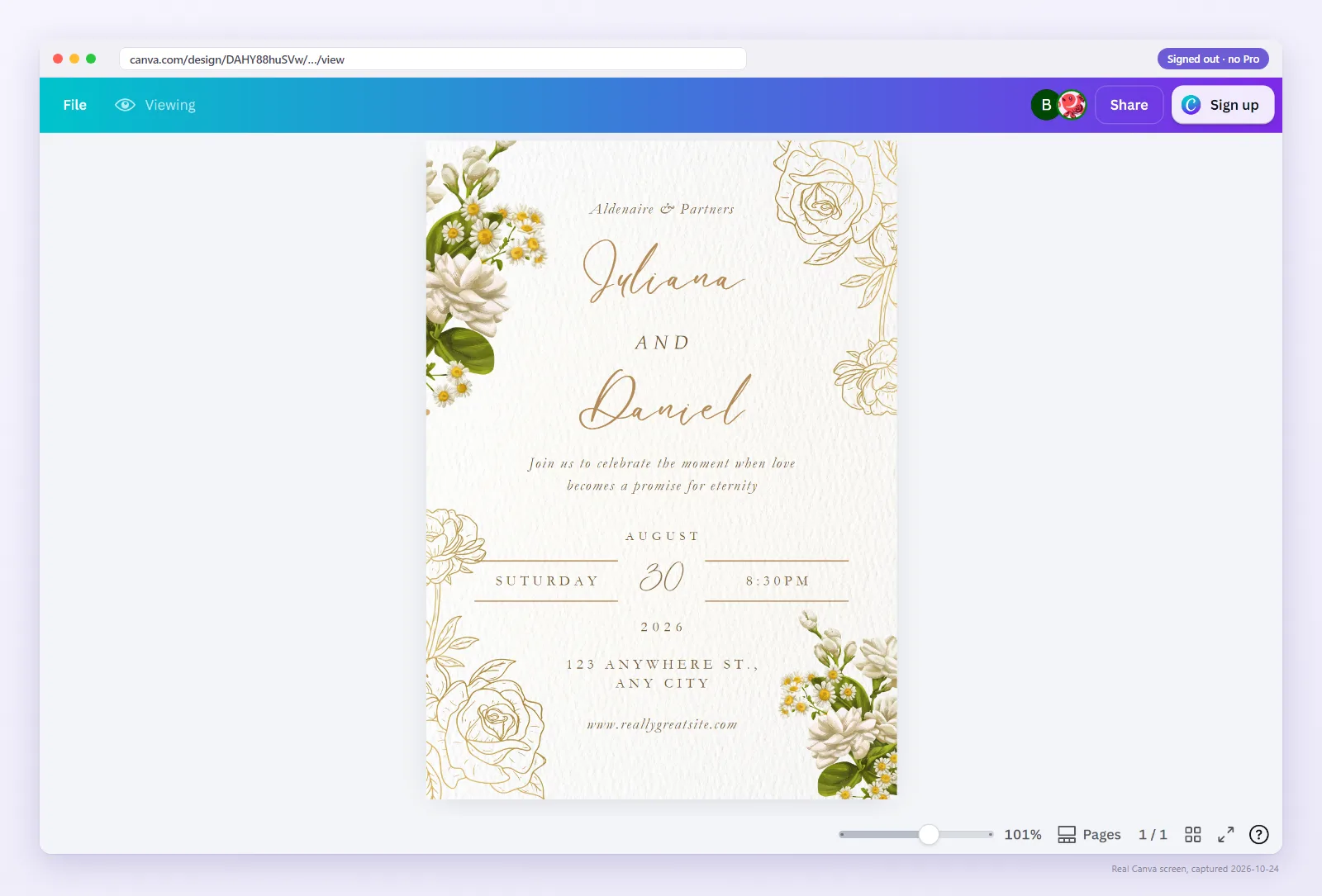
A view link is safe for your master and useless for the buyer. They can scroll through the design but have no button to copy it, which is the second screen pictured above. Many buyers then ask the seller for edit access, and that is how a view link turns into a stream of access requests. If that is happening to you, read people requesting access to my Canva design.
Can you tell them apart from the URL?
Partly. An edit link usually ends in /edit and a view link in /view. Template links also tend to end in /view, often with mode=preview in the query string.
That last part is a trap. Adding ?mode=preview to a view link by hand does not turn it into a template link. How a link behaves comes from the sharing setting Canva stores for it, and you cannot see that in the URL.
The reliable test is to open the link where you are not signed in, or let the checker do it. It reads what Canva actually serves to a stranger and names the link type.
Watch: the same link, two different screens
The owner and the buyer can open the same URL and see completely different things. Here it is in 36 seconds.
Switching from an edit or view link to a template link
- Protect the original. If buyers may already have edited it, make a copy of the design and check it for changes before anything else.
- Create a template link for the clean design: Share → More → Template link.
- Replace the link in your delivery PDF and export it as an interactive PDF.
- Upload the new PDF to every listing that used the old one, and send recent buyers the new link.
- Close the old link. In the Share menu, change the collaboration link's access back to only the people you invite. Canva's wording for this has changed over time; look for the access setting at the top of the Share menu.
Do step 5 last. If you close the old link first, buyers holding the old PDF hit a wall before they have the new link.
Which link is in your PDF?
Paste it here. You will see the link type and the buyer's screen in a few seconds.
FAQ
What is the difference between a Canva template link and a share link?
A template link gives each person who opens it their own copy. A share (collaboration) link gives access to your original design, either to view it or to edit it.
Is it safe to send buyers an edit link?
No. Buyers edit your master file, and their changes show up for every buyer after them. Use a template link.
Can a view link be used as a template?
No. A view link only shows the design. Buyers have no way to copy it, so many of them request edit access instead.
Does adding mode=preview to a link make it a template link?
No. The query string changes nothing on Canva's side. A link's behaviour comes from its sharing setting. Open it signed out to see what it really does.
Which link should I put in my Etsy PDF?
A template link made with Share, then Template link, placed in an interactive PDF. Check it signed out before you upload the PDF.