A one-line widget isn't the same as being compliant
UserWay is one of the most widely installed accessibility overlays: a JavaScript snippet you paste into your site that adds a floating toolbar — bigger text, higher contrast, a screen-reader mode — on top of your existing page, sold as a monthly subscription. It's marketed as a fast, low-effort way to address accessibility, and in places its language has implied real protection against ADA claims. What it doesn't do is touch your actual HTML, CSS or ARIA markup. The underlying code, which is what screen readers, keyboard users and courts actually interact with, stays exactly as it was before you installed it.
None of this means every UserWay customer gets sued, or that the company is acting in bad faith — plenty of businesses install an overlay to solve a real problem cheaply. But the honest answer to "is UserWay a UserWay competitor should trust for compliance?" is: it's not a substitute for fixing your code, and a former customer's own lawsuit argues its marketing overstated what it protects against. If you're looking for a genuine non-overlay accessibility solution instead, code-level remediation is the only approach that actually changes what a screen reader — or a court — sees.
UserWay vs Abledly: a real scan, real fixes you own
Abledly is a non-overlay accessibility solution. There's no script injected into your storefront or website, no floating toolbar, and nothing for a visitor to notice. Instead:
- We scan your actual rendered page with two independent engines (axe-core + IBM Equal Access) plus an AI review layer against WCAG 2.1/2.2 AA — the same category of check plaintiffs' firms run.
- We show you the real issues, with the WCAG success criterion, severity, and proof pulled straight from your page, not a generic checklist or a toolbar's runtime patch.
- We draft code-level fix suggestions that you or your developer apply directly to your markup. The fix lives in your codebase, not in a third-party script — cancel Abledly and your site stays exactly as accessible as you made it.
- We generate your accessibility statement and VPAT/ACR from your real scan results, so you have a dated, documented record of what was checked and when — the kind of evidence that matters if you ever receive a demand letter.
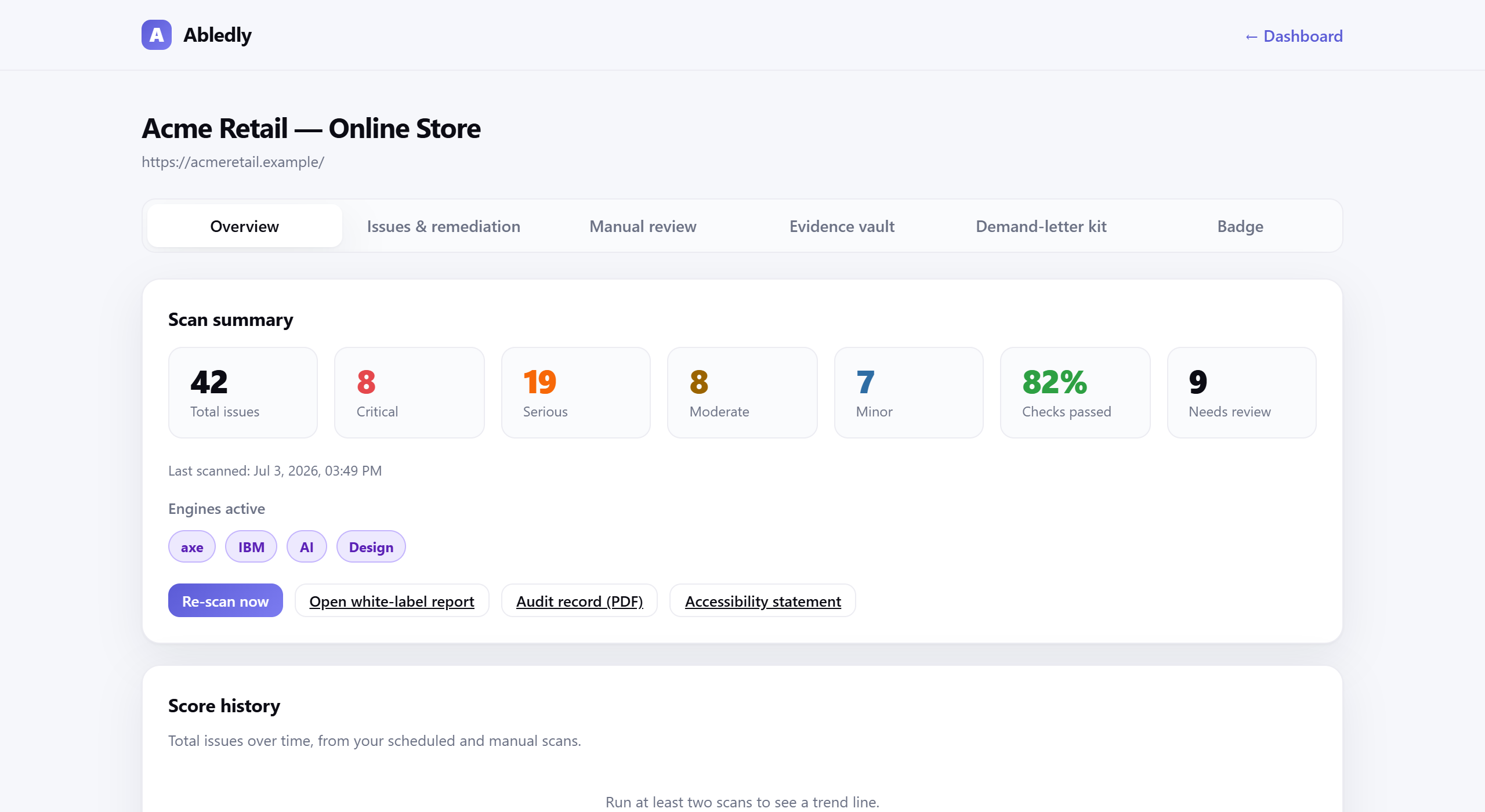
Click to enlarge
An actual Abledly scan report — real WCAG issues found on a real page, each with a drafted code fix.
What we don't do: claim "instant" or "automatic" compliance. No automated tool, including ours, can certify legal compliance, and a clean scan doesn't mean every WCAG criterion has been met — roughly 30-40% of success criteria still need human judgment. We'd rather tell you that upfront than sell you a false guarantee.
| UserWay (overlay widget) | Abledly |
|---|---|
| Approach: one-line JavaScript widget injected into every page at runtime, sold as a subscription | Approach: real scan of your rendered code — two engines plus AI review against WCAG |
| What you get: a floating toolbar (contrast, font size, screen-reader mode) layered on top of your existing markup | What you get: a findings list tied to WCAG criteria, with proof and plain-language fix guidance |
| Underlying code: unchanged — the widget intercepts at runtime, then reverts if the script fails to load or the subscription lapses | Underlying code: you apply real fixes; Abledly re-checks them against your live page |
| Lawsuit exposure: UserWay itself is defending a class action alleging its marketing overstated legal protection (see above) — paying for the overlay isn't proof of compliance | Lawsuit exposure: no widget to fail; your dated remediation record is your evidence |
| Ownership of the fix: lives inside UserWay's script and subscription | Ownership of the fix: lives in your own codebase — it stays when you cancel |
| Works without the tool running: no — accessibility reverts to baseline the moment the script is gone | Works without the tool running: yes — your site is more accessible on its own |
Evaluating Abledly as a UserWay competitor? Here's everything in one place
- Two-engine + AI scan of your live site against WCAG 2.1/2.2 AA, re-run on a schedule
- Plain-language fix guidance for every issue found, tied to the code change and the WCAG criterion it addresses
- A maintained accessibility statement you can publish, generated from your actual scan history
- VPAT / ACR generation for enterprise and government buyers who require one
- A dated audit trail showing when issues were found and fixed — useful if you ever need to demonstrate good-faith effort
- A guided manual-review workflow for the WCAG criteria automation genuinely can't judge on its own
- No widget, ever — nothing added to your site's runtime, nothing for visitors to notice
Weighing more than one overlay before you switch? See how we stack up against the category leader on our accessiBe alternative page. Otherwise, run the free WCAG checker first to see your real baseline, then work through the results with our guide to fixing accessibility issues. Already holding a demand letter? Start with our ADA demand letter guide instead, or see Abledly pricing to find the right plan.
Frequently asked questions
Do accessibility overlays cause lawsuits?
An overlay doesn't cause a lawsuit by itself, but it doesn't reliably prevent one either. EcomBack's 2025 mid-year lawsuit report found that roughly 1 in 4 sites (22.6%) sued over ADA web accessibility in the first half of 2025 already had an overlay or widget installed. UserWay itself is defending a class-action lawsuit from a former customer who alleges the company misrepresented what its overlay could do, and other overlay vendors, including accessiBe, have faced separate FTC action over similar marketing claims.
Is UserWay a bad accessibility tool?
"Bad" depends on what you expect from it. UserWay's toolbar can add genuinely useful runtime controls, like adjustable contrast or text size, for visitors who choose to use them. Where it falls short is as a compliance strategy: it doesn't change your underlying code, it stops working the moment its script fails to load, and a former customer's class-action lawsuit alleges UserWay's marketing overstated the legal protection the widget provides. Treat it as a UI nicety at best, not a substitute for fixing your site.
Is Abledly an overlay?
No. Abledly doesn't inject any script into your storefront or website, and there's no toolbar for your visitors to see. It scans your real page, shows you the actual WCAG issues, and helps you fix the underlying code. Nothing runs on your live site at all.
Can I switch from UserWay to Abledly?
Yes. Remove UserWay's script tag, run a free Abledly scan to see your real baseline (the overlay never touched your underlying markup, so the same WCAG issues are almost certainly still there), and start working through the fix list. There's nothing to migrate — Abledly doesn't depend on anything UserWay left behind.
Does Abledly make my site ADA compliant automatically?
No, and we don't claim it does. No automated tool can certify legal compliance, including ours. Abledly finds and helps you fix machine-detectable issues fast, and guides you through the roughly 30-40% of WCAG criteria that need manual human review. Full conformance is ultimately a legal judgment — this isn't legal advice.
Ready to replace your overlay with something real?
Run a free scan of your actual site — two engines plus AI review, no widget installed, no fake "100% compliant" badge.
Run your free scan →