What is an accessibility statement?
Your website may already have a cookie notice and a privacy policy — but without an accessibility statement, you have a gap that regulators, procurement teams and users with disabilities will notice. A web accessibility statement is not a legal shield that makes complaints disappear. It's a structured, honest declaration of where you stand on WCAG conformance, what known barriers exist, and how someone who hits a problem can reach you. Done right it builds trust. Copied from a boilerplate that claims full compliance you can't prove, it becomes evidence against you.
So what is an accessibility statement, in practical terms? It's a public page — usually linked from your site's footer — that answers three questions for anyone reading it: what standard are you aiming for, how well do you actually meet it today, and how can someone report a problem. A statement covers:
- Which accessibility standard you are targeting (almost always WCAG 2.1 or 2.2 Level AA)
- Your current conformance status — typically "partially conformant"
- Known limitations: specific pages or features that do not yet meet the standard
- How users can report a problem or request an alternative format
- Who enforces the rules if you do not respond (for EU organisations)
- The date the statement was last reviewed
It is distinct from an overlay widget, a badge, or a compliance certificate. Those tools make claims about your site; a statement documents your actual effort and invites accountability instead of hiding behind a script tag.
Who is required to have a web accessibility statement?
The picture varies by jurisdiction, but the direction is the same everywhere: more organisations are expected to publish one, not fewer.
European Union. Public-sector bodies have been required to publish an accessibility statement since 2018 under the Web Accessibility Directive, with required content spelled out in a specific EU template — the Annex to Commission Implementing Decision (EU) 2018/1523 — that must be followed, not paraphrased. Private-sector organisations covered by the European Accessibility Act (EAA), in force for products and services from June 2025, are also expected to maintain one. The EAA applies broadly to e-commerce, banking, transport and telecom services sold in the EU. For the wider picture, see our European Accessibility Act guide.
United States. Federal agencies must comply with Section 508 and publish accessibility information. For private businesses, the ADA doesn't explicitly mandate a statement, but courts and the Department of Justice have consistently treated documented good-faith efforts favourably. Publishing and maintaining an accurate accessibility statement is widely cited by legal practitioners as a meaningful risk-reduction measure, and enterprise procurement teams — especially in healthcare, finance and government contracting — routinely require one. If you're checking your own exposure first, our ADA compliance guide covers what to check.
Other markets. The UK (PSBAR 2018 for the public sector), Canada (AODA for Ontario) and Australia (DDA guidance) each have their own expectations. In most cases, a properly written statement covering the six sections below satisfies all of them at once.
Anatomy of a statement: the six sections it needs
A statement that's actually useful — to a visitor, and to anyone assessing your good-faith effort — covers six things in roughly this order. Skip one and the document reads as a formality instead of a real commitment.
A short statement that accessibility is an ongoing commitment, not a one-off project.
The exact standard you're aiming for — almost always WCAG 2.1 or 2.2 Level AA.
How you actually checked: automated scan, manual testing, or both, and roughly when.
The specific pages or features that don't yet meet the target, named plainly.
A real, monitored way for someone to report a barrier — email or form, not silence.
When it was published and when it was last reviewed. Undated statements read as neglect.
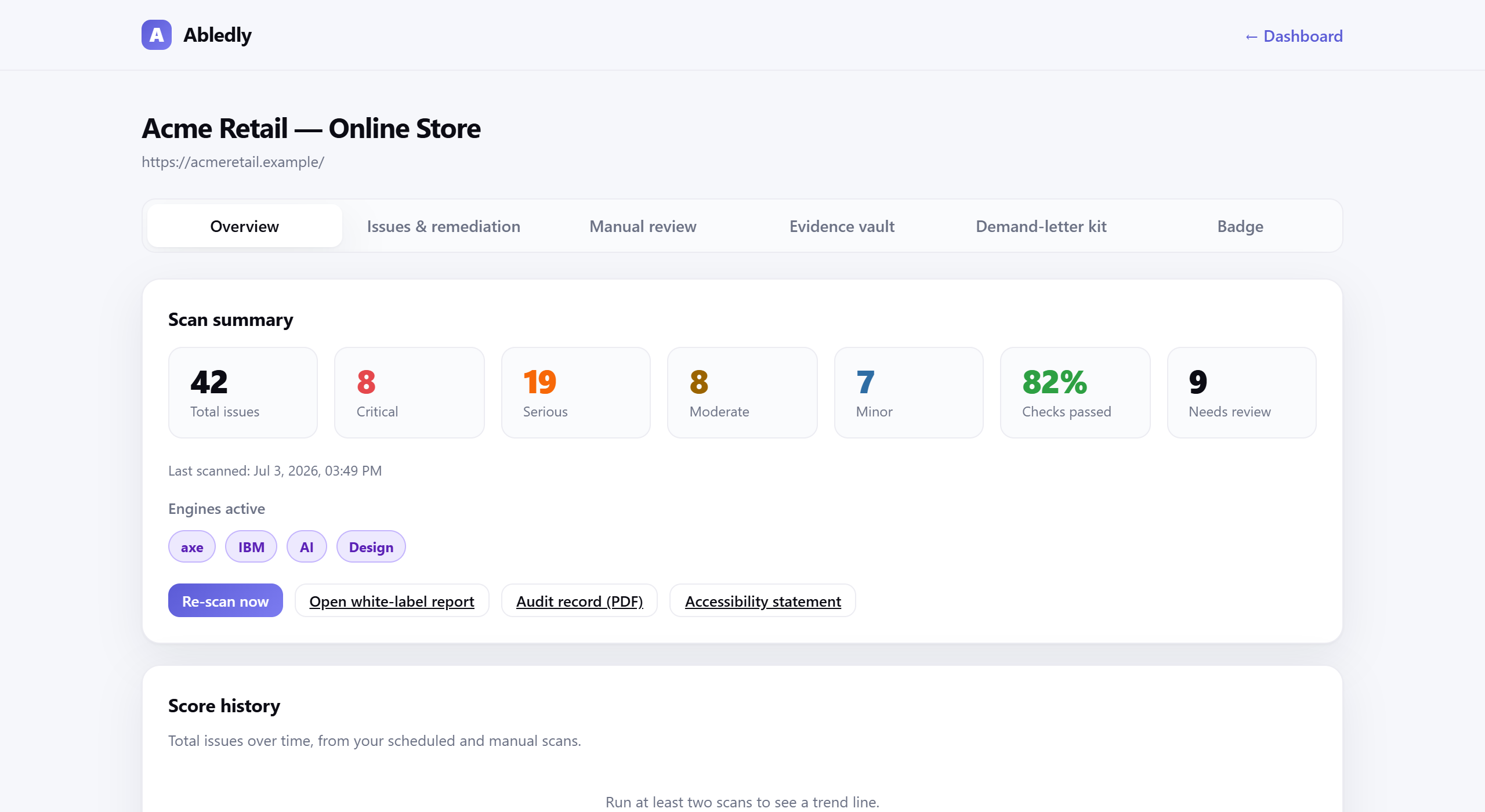
Each band should be genuinely filled in, not templated with vague language. "Assessment method" is worth being concrete about — instead of "we tested this site," name the actual scan engines and date. Below is an actual Abledly scan report: the kind of dated, evidence-backed assessment you can point to for that section, instead of a vague claim.
Click to enlarge
An actual Abledly scan report — real WCAG issues found on a real page, each with a drafted code fix.
Six-point check: before you publish — or re-publish — a statement, make sure it actually covers each of these.
- Commitment statementStates plainly that accessibility is an active, ongoing effort.
- Conformance targetNames the exact standard: WCAG 2.1 or 2.2 Level AA.
- Assessment methodExplains how and roughly when the site was actually checked.
- Known limitationsLists specific known gaps instead of staying vague.
- Feedback / contactGives a real, monitored contact — not just a form nobody reads.
- DateShows when it was published and when it was last reviewed.
What conformance status should you claim?
This is where most organisations make a costly mistake. The three options in the W3C model are:
- Fully conformant — no WCAG 2.1/2.2 AA failures at all. Very few sites qualify, and you must have the documentation to prove it.
- Partially conformant — some content does not conform. This is the honest, correct status for almost every real-world website.
- Non-conformant — the site does not meet the standard and no remediation plan is in place.
Claiming "fully conformant" on a site that has not been rigorously audited is a red flag. It invites complaints, and if a plaintiff can demonstrate failures you have affirmatively denied, the statement becomes evidence of bad faith rather than good faith. The phrase "partially conformant" is not weak — it is credible. Pair it with a list of known issues and a working contact address and you have something defensible.
Keeping your statement current
An accessibility statement is not a document you publish once and archive. Every significant website update can introduce new barriers. Content management systems, third-party widgets, new e-commerce checkouts — all of these can break previously passing criteria without anyone noticing. Best practice is to re-scan and review your statement at least quarterly, and immediately after any major site rebuild or third-party integration.
Abledly's monitoring plans run your site on a scheduled basis using two independent scan engines and flag regressions before they accumulate. When a new issue is found, your statement's known-issues list should be updated accordingly — or the issue fixed and removed from the list.
Generate your accessibility statement free
You can run a free scan on any public URL right now. Abledly uses axe-core and IBM Equal Access — two independent rule sets — plus an AI review layer to surface issues automated checks alone miss. The results feed directly into the accessibility statement generator, which pre-fills your conformance status, populates the known-issues section from real findings, and outputs a statement you can copy to your site or CMS. You fill in your contact details and review date; everything else is drawn from actual data, not guesswork.
The generator produces language aligned with the W3C model accessibility statement and the EU Web Accessibility Directive format. It will not claim full conformance unless your scan is genuinely clean, and it will not invent a review date or contact address you haven't provided.
Prefer to write it yourself, or need offline sign-off from legal first? Our accessibility statement template covers the same six sections as a plain-text, copy-paste starting point — no scan required, though pairing it with a real scan is what makes the claims inside it true.
Frequently asked questions
What is an accessibility statement?
An accessibility statement is a public page on your website that states which accessibility standard you're targeting (typically WCAG 2.1 or 2.2 Level AA), your current conformance status, any known limitations, how to report a problem, and the date it was last reviewed. It documents your actual effort — it is not an overlay widget, a badge, or a compliance certificate.
Is an accessibility statement legally required?
For public-sector bodies in the EU it is a hard requirement under the Web Accessibility Directive. Under the European Accessibility Act, private-sector organisations subject to the Act must publish one from June 2025. In the US there is no explicit federal mandate for a statement, but publishing one and keeping it current is widely considered evidence of good-faith compliance under ADA Title III, and many enterprise procurement teams require it.
What conformance status should I claim in my accessibility statement?
Most sites should claim "partially conformant" with WCAG 2.1 Level AA, meaning some criteria are not fully met. Claiming "fully conformant" is a serious legal and reputational risk unless you have completed and documented a thorough audit covering all content. Overstating conformance can be used against you if a complaint is filed.
How often should I update my accessibility statement?
You should update your accessibility statement whenever you make significant changes to your website, fix known issues listed in it, or at least once a year. EU public-sector rules require the statement to show the date it was last reviewed. Treating it as a living document rather than a one-time PDF is both more credible and more useful to users with disabilities.
How do I generate an accessibility statement for free?
Run a free scan of your site with Abledly. It checks your pages with axe-core and IBM Equal Access plus an AI review layer, then feeds the real findings straight into a statement generator that pre-fills your conformance status and known-issues list. You add your contact details and review date; nothing is invented. If you'd rather write it yourself, our accessibility statement template covers the same six sections as a copy-paste starting point.
Build a credible accessibility statement today
Scan your site, get real findings, and generate a statement that reflects your actual status. Free. No account required to start.
Generate yours free →