WCAG 2.2 is the current benchmark — here's what actually changed
The Web Content Accessibility Guidelines (WCAG) are published by the W3C's Web Accessibility Initiative, and WCAG 2.2 became a W3C Recommendation on October 5, 2023. It keeps every success criterion from WCAG 2.1, adds nine new ones, and removes one that was declared obsolete (4.1.1 Parsing, which no longer applies to modern browsers and markup). At the AA level — the bar almost every accessibility standard and lawsuit references — WCAG 2.2 is now the most current, complete version of the guidelines.
No US federal law names "WCAG 2.2" by version number yet. The Department of Justice's 2024 ADA Title II rule for state and local government websites specifically cites WCAG 2.1 AA as its technical standard. Compliance dates are April 26, 2027 for public entities serving 50,000 people or more, and April 26, 2028 for smaller ones and special district governments (extended by a DOJ interim final rule, Apr 2026, which pushed both dates back one year from the original April 2026/2027 schedule). Private ecommerce sites aren't bound to one named version by statute, but WCAG AA — 2.1 or 2.2 — is consistently what plaintiffs' firms, demand letters and settlement agreements point to as evidence a site is "readily accessible." If you sell into the EU, the requirements referenced by the European Accessibility Act point the same direction; see our EAA checker if that applies to you. Building to WCAG 2.2 AA requirements for ecommerce today means you're not rebuilding again next year when 2.2 becomes the named standard everywhere else.
WCAG 2.2 requirements for ecommerce: all 9 new success criteria
Six of the nine additions are required at AA (or A, which AA also requires); the other three are AAA-only "stretch" criteria, useful to know about but not required for standard AA conformance. Here's what each one means for a store, and whether a scanner can catch it on its own.
| Success criterion | Level | What to check on a store | Scan or manual? |
|---|---|---|---|
| 2.4.11 Focus Not Obscured (Min.) | AA | Sticky headers, cookie banners and chat widgets can't fully hide the item that currently has keyboard focus. | Manual |
| 2.5.7 Dragging Movements | AA | Image zoom sliders, before/after comparisons and drag-to-reorder controls need a non-drag alternative, like buttons. | Manual |
| 2.5.8 Target Size (Minimum) | AA | Clickable targets — swatches, quantity steppers, remove-from-cart icons — are at least 24×24 CSS px, or have enough spacing. | Automated |
| 3.2.6 Consistent Help | A | If you offer help (chat, phone, FAQ link), it appears in the same relative place on every page. | Manual |
| 3.3.7 Redundant Entry | A | Checkout never makes a shopper retype information already given earlier in the same flow. | Manual |
| 3.3.8 Accessible Authentication (Min.) | AA | Login and checkout accept password managers and pasted passwords, without relying solely on a puzzle-only CAPTCHA. | Manual |
| 2.4.12 Focus Not Obscured (Enh.) | AAA — stretch | Focused item is never even partially covered. | Manual |
| 2.4.13 Focus Appearance | AAA — stretch | Focus outlines are large and high-contrast enough to spot at a glance. | Automated + Manual |
| 3.3.9 Accessible Authentication (Enh.) | AAA — stretch | No object-recognition or personal-content puzzle at all, even with an alternative offered. | Manual |
Click to enlarge
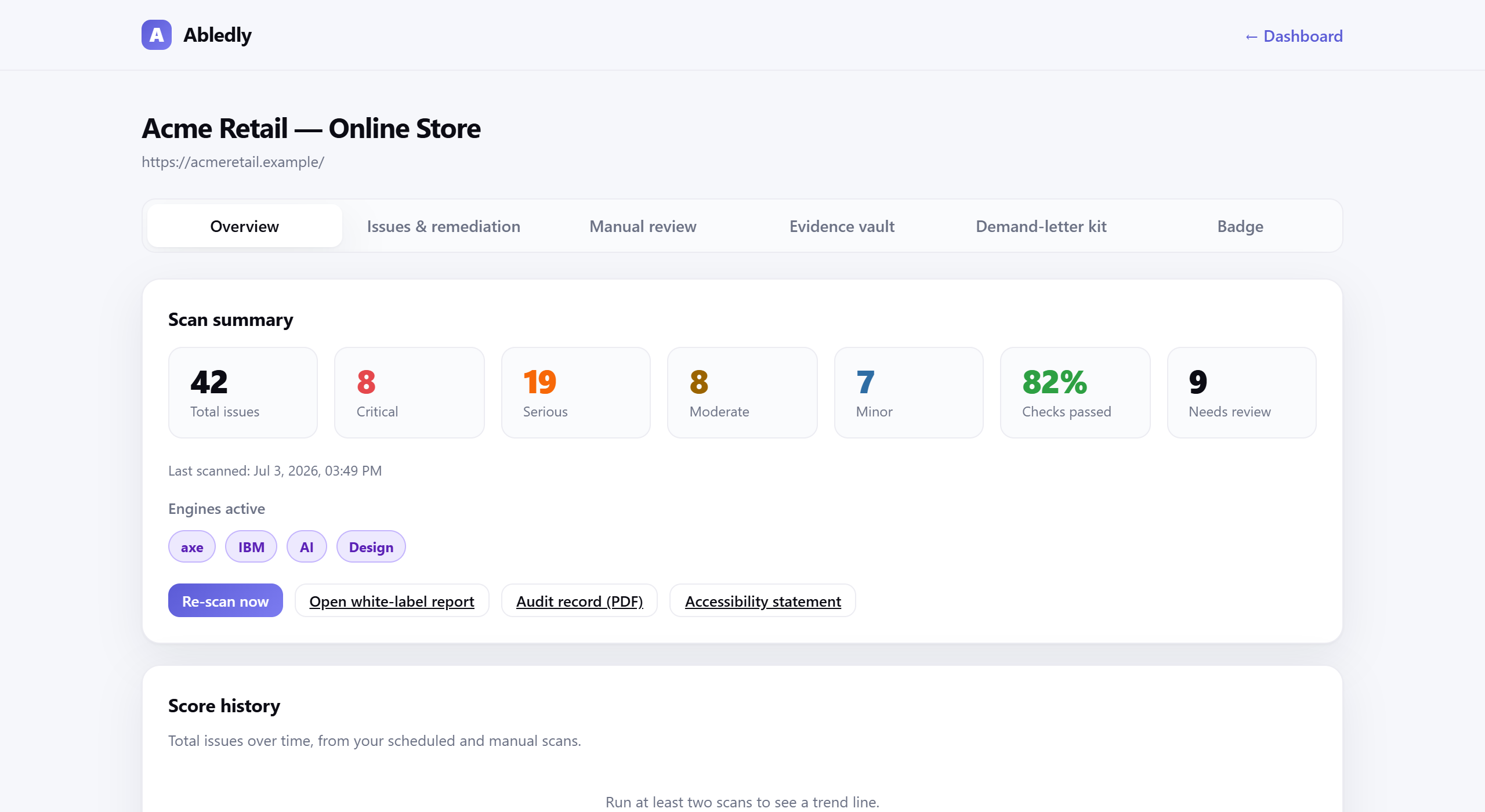
A real Abledly scan report — WCAG issues tied to the exact success criterion, with severity and a drafted fix.
The practical WCAG 2.2 AA checklist
Run this against your homepage, a category page, a product page and your cart/checkout — not just the homepage. Most WCAG 2.2 compliance problems that turn into lawsuits live in the pages a customer has to get through to actually buy something.
Perceivable
- 1.1.1Alt text on every meaningful image — product photos, banner images, and icons used as buttons describe their purpose, not just a filename. Automated to flag missing; manual to judge quality
- 1.4.3Contrast ≥ 4.5:1 for body text, and ≥ 3:1 for large text and UI components like buttons and icons. Automated
- 1.4.1Color isn't the only signal — sale badges, stock status and form errors also use an icon or word ("Sold out"), not just red text. Manual
- 1.2.2Captions on product videos and a transcript for any audio-only content. Manual
- 1.4.10Reflow at 400% zoom — cart and checkout stay usable with no horizontal scrolling. Manual
Operable
- 2.5.8Target size ≥ 24×24px for quantity steppers, size/color swatches, filter chips and remove icons. Automated
- 2.5.7Non-drag alternative for any drag interaction — image zoom, comparison sliders, drag-to-reorder. Manual
- 2.4.11Focus never fully hidden by sticky headers, cookie banners or chat widgets. Manual
- 2.1.1Full keyboard operability for mega-menus, filter accordions, quick-view modals and size-chart popups, each closable with Escape. Manual
- 3.2.6Consistent help placement — a chat widget, phone number or FAQ link shows up in the same relative spot on every page. Manual
Understandable
- 3.3.7No redundant entry — checkout offers "same as shipping" or autofill instead of asking for the same information twice. Manual
- 3.3.8Accessible authentication — login and checkout accept password managers and pasted passwords, with an alternative to any puzzle-only CAPTCHA. Manual
- 3.3.1Visible labels, not placeholder-only text, and errors described in words, not just a red border. Automated for missing labels
- 3.2.3Consistent navigation — search, filters and category structure behave the same way from page to page. Manual
Robust
- 4.1.2Custom components expose name, role and state — size/color pickers, price sliders, star ratings and accordions, not just a styled
<div>. Automated + manual - 4.1.3Status messages are announced — "Added to cart" or "Now out of stock" reach screen reader users via
aria-live, not just a visual toast. Manual - Valid, well-structured markup — headings, lists and landmarks used correctly so assistive tech can navigate the page. Automated
Frequently asked questions
What is WCAG 2.2 and how is it different from WCAG 2.1?
WCAG 2.2 became a W3C Recommendation on October 5, 2023. It keeps every WCAG 2.1 success criterion and adds nine new ones, covering focus visibility, dragging movements, minimum target size, consistent help, redundant entry and accessible authentication. It also removes one obsolete criterion, 4.1.1 Parsing. If a site already meets WCAG 2.1 AA, most of the extra work for WCAG 2.2 AA is in the six new AA and A-level criteria, not a full rebuild.
Is WCAG 2.2 legally required for ecommerce sites?
Not by name, not yet, in the US. The DOJ's 2024 ADA Title II rule for state and local government sites specifically names WCAG 2.1 AA as its technical standard, with compliance dates of April 26, 2027 for public entities serving 50,000 people or more, and April 26, 2028 for smaller ones and special district governments (extended by a DOJ interim final rule, Apr 2026). Private ecommerce sites aren't bound by one named version, but WCAG at the AA level, whether cited as 2.1 or 2.2, is consistently what courts, demand letters and settlement agreements point to as evidence a site is "readily accessible." Building to WCAG 2.2 AA today covers the newer criteria too, instead of leaving them for a future rebuild. See our ADA compliance checker for a US-specific view.
What's new in WCAG 2.2 that actually matters for an online store?
The additions most relevant to ecommerce are Target Size (2.5.8 — buttons, swatches and icons need to be large enough to hit), Dragging Movements (2.5.7 — image sliders and zoom controls need a non-drag alternative), Redundant Entry (3.3.7 — don't make shoppers retype shipping details at billing) and Accessible Authentication (3.3.8 — checkout logins need to accept password managers, not rely purely on a puzzle). All four map directly onto cart and checkout, which is where most accessibility lawsuits focus.
Can an automated scanner fully check WCAG 2.2 compliance?
No. Automated tools like axe-core and IBM Equal Access reliably catch missing alt text, contrast failures, missing form labels and structural ARIA problems — roughly 60-70% of a full WCAG 2.2 checklist. The rest, including whether alt text is actually meaningful, whether focus order makes sense, or whether help is genuinely easy to find, needs a person to look at the page. Treat a clean automated scan as a starting point, not a finish line.
Where should I start if I've never done an accessibility check?
Run a free scan of your homepage, a category page, a product page and your checkout flow — those four page types cover most of what a plaintiff's firm or an auditor will look at. Fix the automated findings first since they're usually quick wins (missing alt text, contrast, labels), then work through the manual-review items on this checklist against your actual purchase flow.
Turn this checklist into a fixed list
Run a free WCAG 2.2 scan of your homepage, product page and checkout, and see exactly which of these items you're already passing.
Run your free scan →