AODA, in plain language
The Accessibility for Ontarians with Disabilities Act, 2005 (AODA) is Ontario provincial legislation aimed at making the province accessible to people with disabilities. Its website rules live inside the Integrated Accessibility Standards Regulation (IASR, O. Reg. 191/11), specifically the Information and Communications Standard — Section 14 of that regulation covers "Accessible websites and web content."
Per Ontario's own guidance, as of January 1, 2021, Section 14 requires WCAG 2.0 Level AA conformance for public-facing websites and web content if your organization is either:
- a designated public-sector organization (municipalities, school boards, hospitals, universities, colleges and most other public bodies), or
- a private business or non-profit with 50 or more employees operating in Ontario.
Two success criteria are exempted for everyone except the Government of Ontario and the Legislative Assembly: 1.2.4 (live captions) and 1.2.5 (pre-recorded audio description). And under subsection 14(5), the WCAG requirement doesn't reach back to content published before January 1, 2012 that was never substantially updated afterward — content posted or revised from 2012 onward is in scope.
Separately from the website standard, any Ontario business or non-profit with 20 or more employees must file an accessibility compliance report with the province every three years through the Accessibility Compliance Reporting Portal, attested by a director or senior officer. 2026 is a reporting year — the next deadline is December 31, 2026, which is part of why AODA is back on a lot of Ontario organizations' radar this year.
Scan against WCAG 2.0 AA, fix the code, document the work
Abledly isn't an AODA-certification service — no automated tool can legally certify anything, and we won't pretend otherwise. What it does is take the actual standard AODA points to (WCAG 2.0 AA, and the newer 2.1/2.2 AA that supersedes it) and make it concrete for your real site:
- We scan your live, rendered pages with two independent engines (axe-core + IBM Equal Access) plus an AI review layer, checked against WCAG 2.1/2.2 AA — which covers everything IASR's WCAG 2.0 AA requirement asks for.
- We show the real issues, each tied to its WCAG success criterion, severity, and the exact element on your page — not a generic checklist.
- We draft code-level fix suggestions for HTML, CSS and ARIA markup that you or your developer apply directly. The fix lives in your codebase, not in a third-party script.
- We generate an accessibility statement and VPAT/ACR from your actual scan results — a dated record that's useful for a multi-year accessibility plan, an internal audit, or your accessibility compliance report.
Click to enlarge
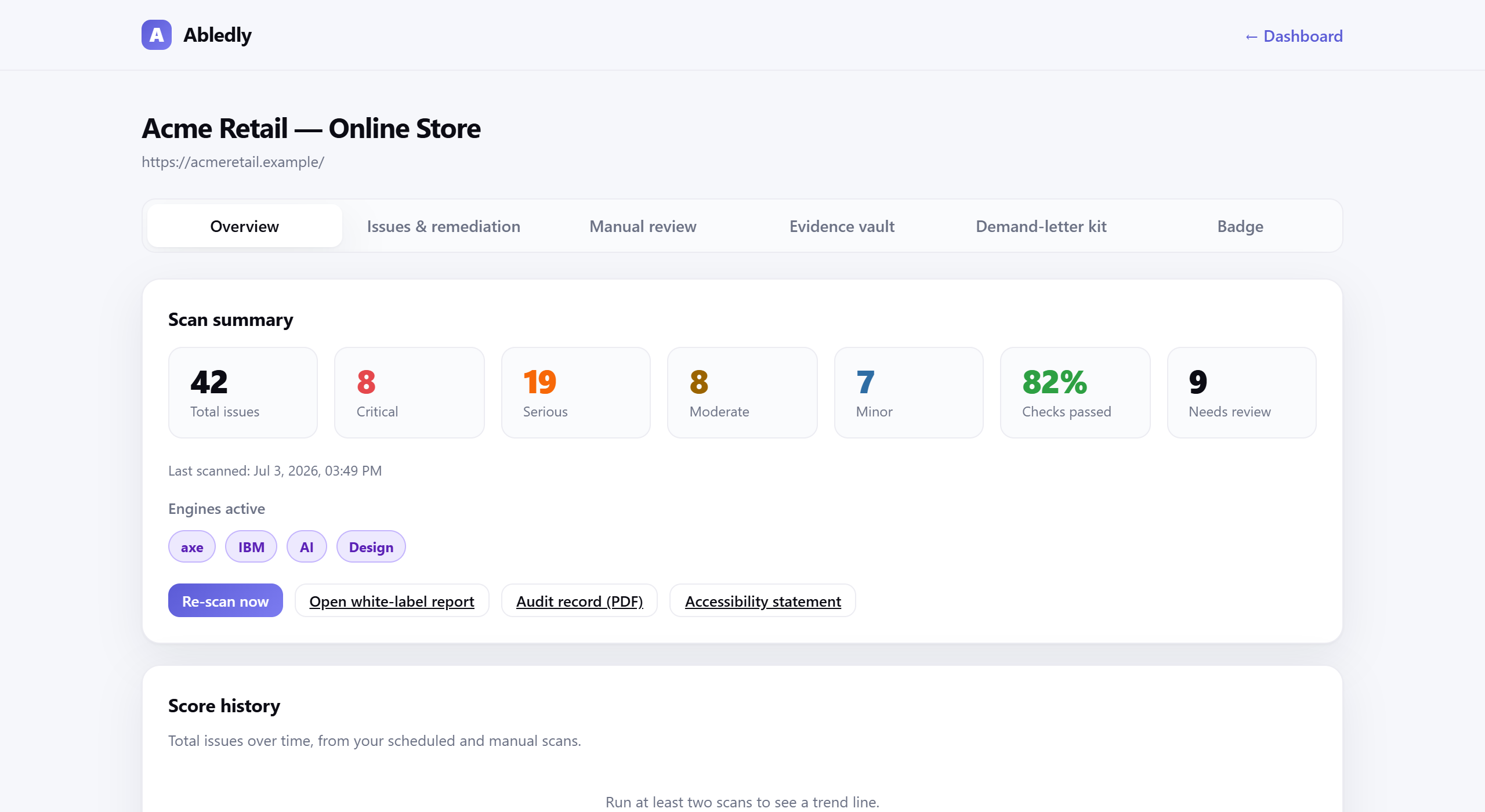
An actual Abledly scan report — real WCAG issues found on a real page, each with a drafted code fix.
What we don't do: promise "instant" or guaranteed AODA compliance. A clean scan means the machine-detectable portion of WCAG 2.0/2.1/2.2 AA looks good on the pages we checked — it isn't a legal determination, and it doesn't cover the roughly 30-40% of WCAG criteria that need a human to judge (like whether alt text is actually meaningful, not just present).
Everything you need to work toward AODA's website standard
- Two-engine + AI scan of your live site against WCAG 2.1/2.2 AA, re-run on a schedule
- Plain-language fix guidance for every issue found, tied to the code change and the WCAG criterion it addresses
- A maintained accessibility statement you can publish, generated from your actual scan history
- VPAT / ACR generation for institutional and government buyers who require one
- A dated audit trail showing when issues were found and fixed — useful for a multi-year accessibility plan or a compliance report
- A guided manual-review workflow for the WCAG criteria automation genuinely can't judge on its own
- No overlay widget, ever — nothing added to your site's runtime, nothing for visitors to notice
Serving customers outside Ontario too? See our ADA compliance checker for U.S. requirements or the EAA checker for the EU's European Accessibility Act, or go straight to fixing the issues we find.
Frequently asked questions
What does AODA stand for?
AODA stands for the Accessibility for Ontarians with Disabilities Act, 2005 — Ontario provincial legislation that sets accessibility standards for public-sector organizations and private businesses and non-profits operating in Ontario, including a standard for websites and web content.
Does AODA require WCAG 2.0 or 2.1?
AODA's Information and Communications Standard, under the Integrated Accessibility Standards Regulation (O. Reg. 191/11), specifically requires WCAG 2.0 Level AA, not 2.1 or 2.2. In practice, meeting the newer WCAG 2.1 or 2.2 AA also satisfies the 2.0 AA requirement, since each version builds on the last. Two success criteria — 1.2.4 (live captions) and 1.2.5 (pre-recorded audio description) — are exempt for every organization except the Government of Ontario and the Legislative Assembly.
Does AODA apply to my business?
The WCAG 2.0 AA website requirement applies to designated Ontario public-sector organizations and to any private-sector business or non-profit with 50 or more employees, as of January 1, 2021, per Ontario's official AODA website guidance. Separately, organizations with 20 or more employees must file an accessibility compliance report with the province every three years — the next deadline is December 31, 2026. Smaller organizations still have other AODA obligations, like customer service and employment standards, even if the WCAG website rule doesn't apply to them yet.
Does AODA apply to content published before 2012?
No. Under subsection 14(5) of the IASR, the WCAG 2.0 requirement doesn't apply to web content that was published before January 1, 2012, and was never significantly updated after that date. Anything posted or substantially revised from 2012 onward is in scope once your organization meets the size or public-sector threshold.
Can a scanning tool make my site AODA compliant automatically?
No, and Abledly doesn't claim it does. No automated tool, including ours, can certify legal compliance. Automated and AI checks reliably catch a large share of WCAG 2.0 AA issues, but roughly 30-40% of WCAG success criteria require human judgment — things like whether alt text is actually meaningful, or a form's error messages are genuinely clear. Abledly finds and helps you fix what's machine-detectable fast, and guides your team through the manual review the rest requires.
See where your site stands against WCAG 2.0 AA
Run a free scan of your actual site — two engines plus AI review, real WCAG issues, drafted code fixes, no overlay widget.
Run your free scan →